
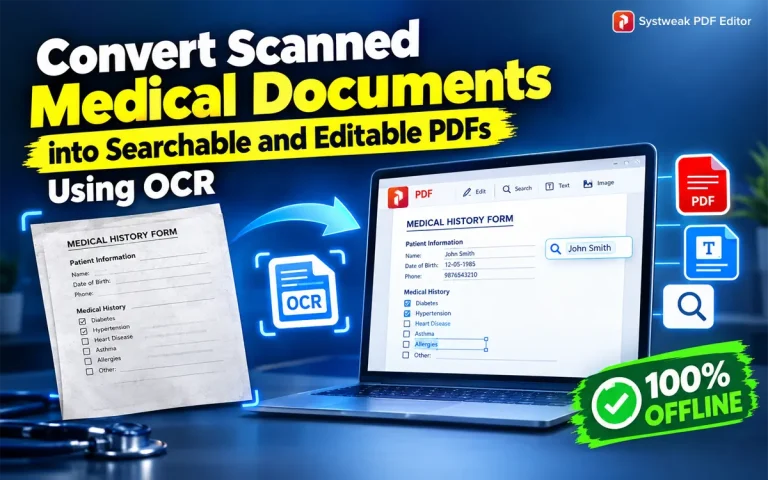

PDF documents are the most popular type of digital documents used across the globe. There are two types of PDF documents: Scanned PDFs & Editable PDFs. A scanned PDF is a collection of documents or images in a non-editable format that is created by taking pictures of physical documents or joining images together. However, Editable PDFs can be edited and searched, and these documents are created from scratch or converted from another document format to PDF using PDF editor software.
Scanned PDFs are good for record-keeping but are not useful when a user wants to edit or search information within the PDF. For example, if you have a scanned medical form, then you can neither make changes to it nor search data within the PDF. And we all know that it would be time-consuming and effort-intensive to recreate the document from scratch. The Good News is that we have a solution that will help you convert your scanned medical forms into searchable and editable documents in no time.
What you need is a PDF Editor software with an Optical Character Recognition feature, like Systweak PDF Editor, to convert your scanned documents into a normal PDF that can be edited and searched.
How to Identify a Scanned PDF That Needs OCR
All PDFs may not necessarily require the OCR process. Documents created on the computer, which may have been typed using applications like MS Word, already come with searchable text. Medical PDFs are usually those that have been scanned into the computer in the form of images of documents, including laboratory tests, medical prescriptions, and other documents found in hospitals.
To determine whether a PDF file needs the OCR process, one could open up the document in the PDF viewer and try to click on any word or sentence in the document. Another approach would be to click Ctrl +F on the document and search for a word in it. If the word cannot be highlighted and the word cannot be searched in the document, then the document is an image-based PDF document.
Why Should You Make Scanned Medical Forms Searchable?
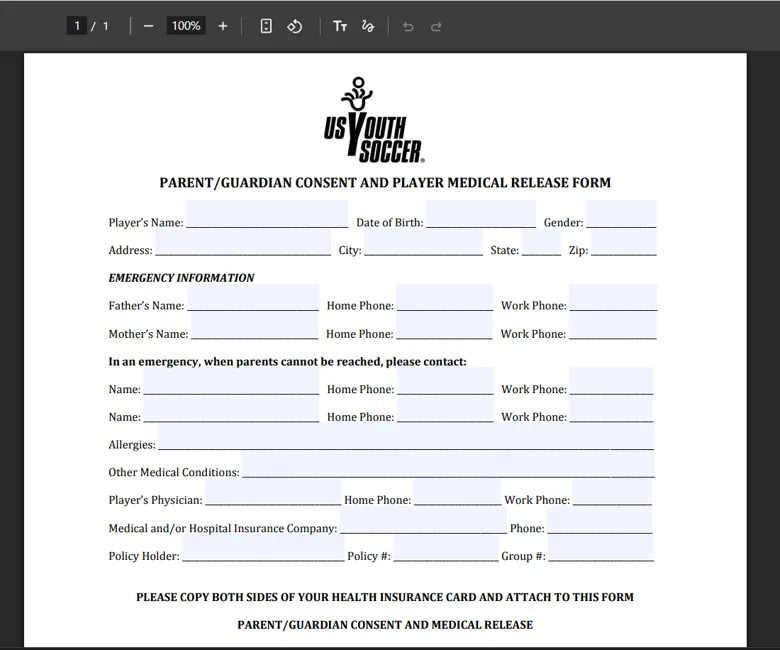
The ability to search through medical records is valuable to both an individual and a medical institution because it will enable them to access the digital document more easily without altering its original intended purpose.
1. Locate Relevant Medical Information More Easily
The medical records may include several pages of prescriptions, consultations, diagnoses, discharge papers, and insurance details. Using the OCR tool to add a searchable text layer to your file will make it easier to find the information you need using a name, date, or a certain test. You do not have to open each page individually.
2. Manage Large Collections of Medical Documents
Digital archives can be maintained in hospitals, clinics, diagnostic laboratories, and even administrative offices. OCR would facilitate indexing and searching of scanned files if done in combination with uniform filenames, folders, and document management. For instance, clinics can manage their scanned files according to patient ID, type of record, and date, and then use OCR to find necessary data in each particular file.
3. Reduce Human Labor in Data Input
The identified text could be simply copied to notes, spreadsheets, or other authorized places instead of manual retyping of the data from paper documents. This is very useful when moving information from old documents to the new filing system. Nevertheless, OCR data must be verified before inputting information about patients into another system. Mistaken names, points, units, medications, and other elements could result in serious mistakes.
4. Make Documents Accessible
A searchable text can be helpful for text selection and screen readers when the PDF is structured correctly as well. However, OCR by itself does not ensure that a document fulfills all the requirements related to accessibility; nevertheless, it makes a necessary step forward.
5. Preserve Old Paper Forms in Digital Repositories
Paper medical forms may decay, get lost, and occupy too much storage space. Making a paper form a searchable PDF document is helpful for saving its content in a more convenient digital form. When making long-term archives for medical records, it is necessary to keep page images, choose proper file quality, and back up documents securely. According to the NHS England specification for digitization, one should make text-searchable PDFs and scan pages at least 300 dpi.
Types of Medical Documents That Can Be Made Searchable With OCR
OCR technology could be employed to convert scanned medical documents into searchable formats. It would be especially beneficial in cases where one needs to find specific information in several pages of medical documents.
Medication prescriptions: Detect printed names of medications, dosing information, dates of prescription, etc. Handwritten prescriptions would require additional verification.
Laboratory reports: Identify test names, patient information, dates of the reports, and printed results of the tests without reading all pages.
Discharge summaries of hospitals: Detect patient’s diagnosis, summary of the treatment, discharge instructions, and other follow-ups.
Patient registration forms: Detect patients’ names, ID numbers, contact information, and other printed data.
Insurance documents: Detect policy numbers, claims, dates, and other related information.
Diagnosis reports: Detect printed information in diagnosis and imaging reports.
OCR performance will depend on the quality of the document, its format, and the OCR software used. Tables, handwritten notes, stamps, and medical abbreviations will require additional verification.
How to Prepare Medical Documents for Accurate OCR Recognition
The quality of the original image also affects the accuracy of recognition of the medical document by the OCR program. Blurred images, tilting of the pages, fading print,g and even handwritten corrections may affect the recognition process. The preparation stage for converting a medical form to a searchable PDF includes the following recommendations:
- Choose the appropriate resolution: 300 DPI is often advised as a default resolution for text documents. It allows recognizing small printed letters, numbers, and punctuation.
- Keep pages straight: the document must not be tilted and must not have any parts of the page partially cut off.
- Make sure there is enough contrast: it is easier to recognize the letters when they stand out well against the background. Avoid overly dark, faded, or shadowed scans.
- Specify the correct language: use the same language thath was used for creating the document.
- Check all the pages: make sure the prescription, laboratory values, dates, and other data are legible before running OCR.
In case the original document is damaged or difficult to read, rescanning is advisable. However, even if the document meets all the recommendations listed above, the OCR still can’t recognize what was not available in the original document.
How To Make Scanned Medical Forms Searchable With Systweak PDF Editor?
1. Download and install Systweak PDF Editor using the download button link provided below.
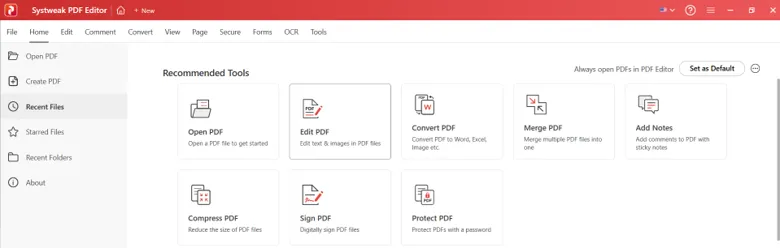
2. Open the software and click on the Open PDF button and select your scanned PDF.
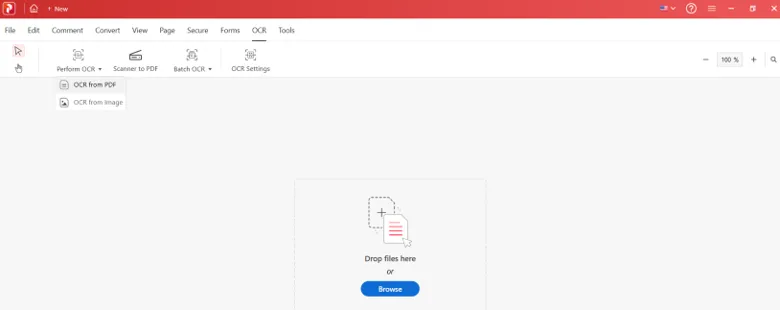
3. Click on the OCR tab at the top and choose the Perform OCR button.
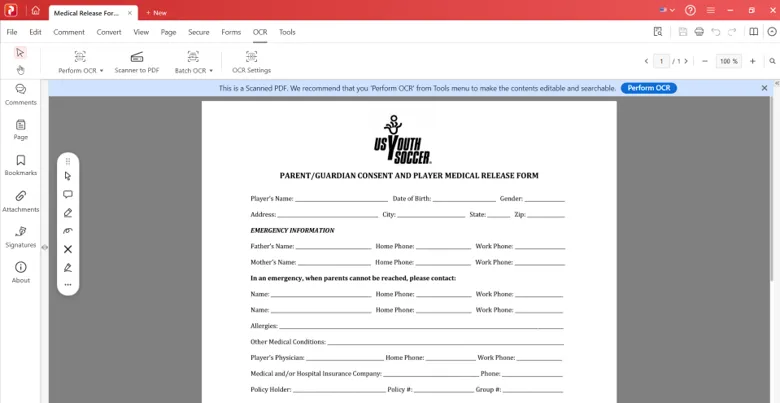
4. Select the OCR from PDF option.
5. In the new box, you can choose the output folder if you wish to place the new PDF in a different folder. The default settings will place the PDF in the original folder with a different name.
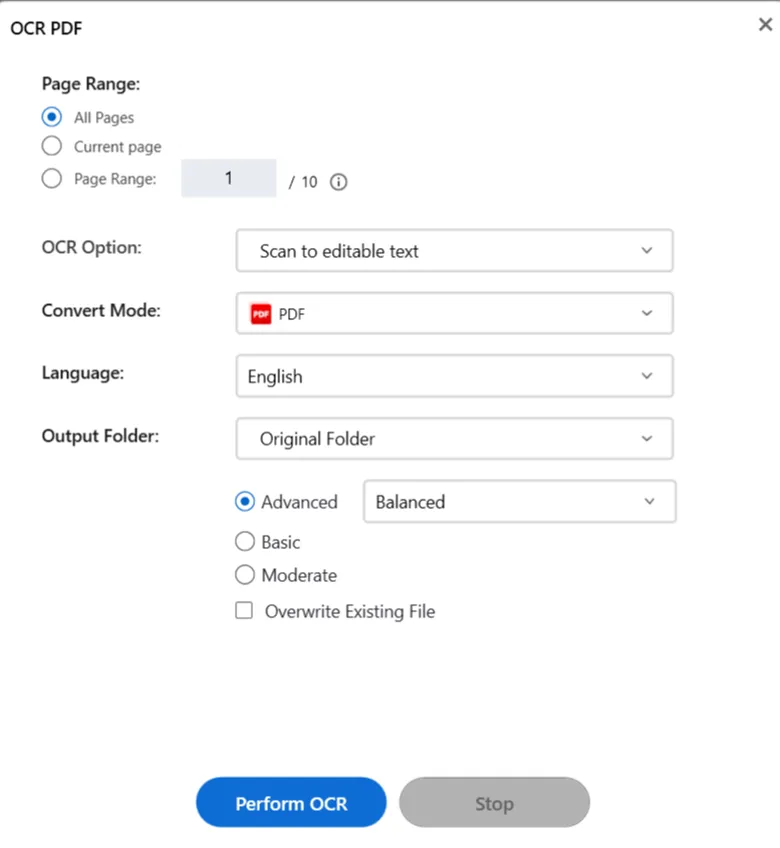
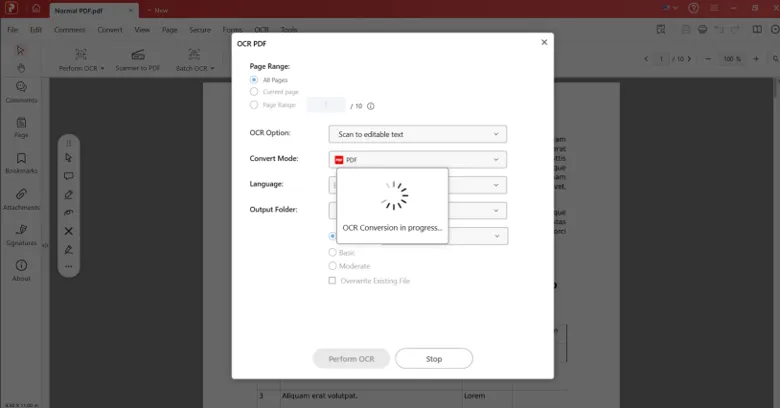
6. Click on the Perform OCR button and wait for the process to complete.
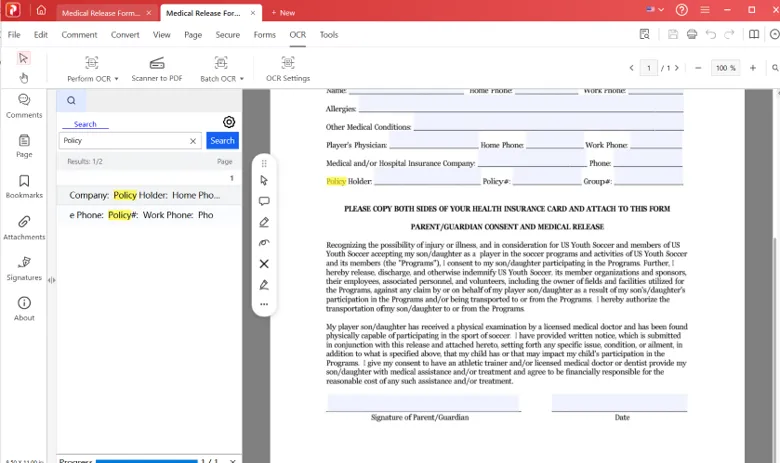
7. A new window will open where the PDF will be searchable. Press CTRL + F to open the search box and type in a word you wish to search.
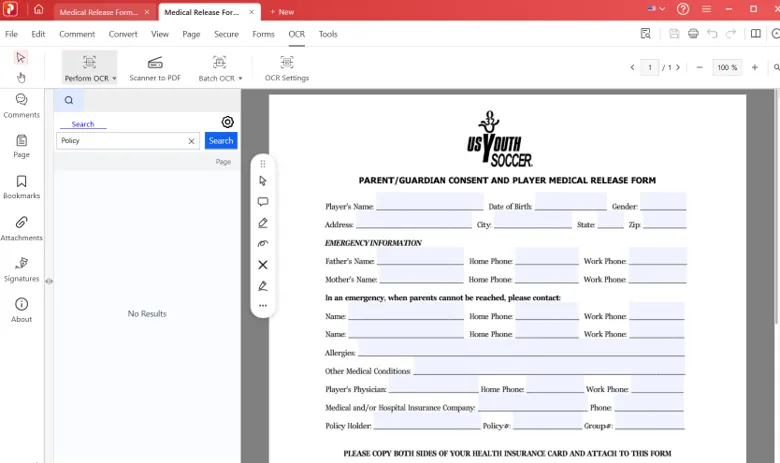
8. Click on the Search button, and all the matching results will appear in the search box.
How to Verify the Accuracy of OCR-Processed Medical Documents
Once the OCR process is over, it will be necessary to confirm whether the program was able to recognize the right information from the scanned medical file. It will be possible to look for a number of clearly visible elements like the name of the patient, the date of the report, the name of the test, and many others.
It will be possible to cut out a portion of the recognized text and compare it to the initial scanned document. Numbers, decimal points, drug names, medical abbreviations, and laboratory units need extra attention since an error in the recognition of even one character might completely change the meaning of the results.
Common Challenges When Using OCR on Medical Documents
While OCR makes it easy to perform searches on scanned documents, there are some things that might impact OCR text recognition quality. Handwritten prescriptions, handwriting, and medical abbreviations can be hard to recognize by OCR tools. In the same way, lab reports that have many numbers close to each other, decimal points, tables, and columns might not necessarily keep their original text relationships once recognized.
A bad scan can cause more difficulties for OCR. Faded printing, folded pages, shadows, bad resolution, and incorrect language selection can lead to lost and misrecognized text. If you receive bad results from OCR, try scanning your document under better conditions or improving its image quality first. When it comes to medical documents, recognized text is to be used as a reference only. Important information should always be compared to the original one.
The Final Word On Converting Scanned Medical Forms Into Searchable Documents.
The implementation of the use of OCR to make the scanned medical forms searchable is going to ease the process of looking up the patient information, analyzing the laboratory report as well as archiving the documents digitally. The user will have to choose appropriate OCR software, scan the documents clearly, pick the right language, and cross-check some of the information with the original documentation.